
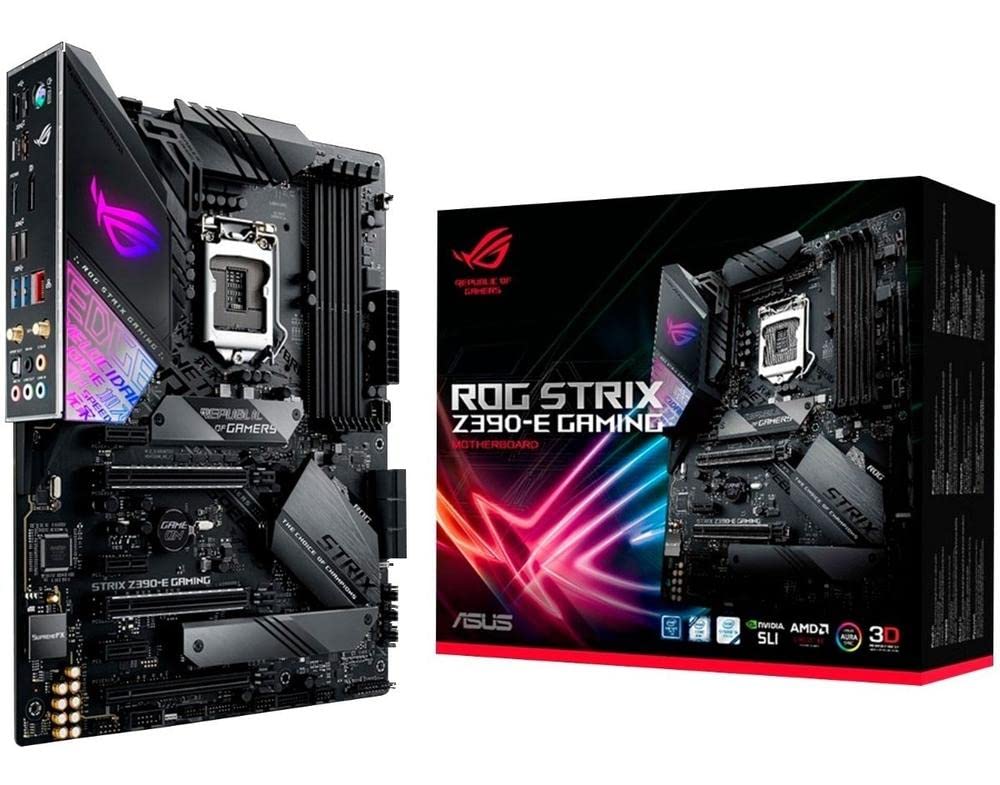
Review of the Asus ROG Strix Z390-E Gaming Motherboard in the Computer Motherboards category.
Why choosing Computer Motherboards is difficult#
Selecting the right motherboard can be complex due to the variety of factors involved. Each motherboard must align with specific processor generations, memory compatibility, storage options, and peripheral support. The Asus ROG Strix Z390-E is tailored for Intel LGA1151 sockets, making it compatible with 8th and 9th Gen processors but not newer models. Users need to ensure their CPU and other components are fully supported by the motherboard’s chipset and BIOS.
Common buyer mistakes#
One common mistake is overlooking compatibility between the motherboard and other system components. For example, using an incompatible power supply or cooling solution can lead to instability or hardware failure. Another oversight is not considering future-proofing—while the Z390-E supports current Intel processors, it may lack features required by newer chipsets. Buyers should also verify that their case has sufficient space for the ATX form factor and that all necessary ports (such as USB 3.1 Gen2 or M.2 slots) are available.
Real-world use and expectations#
In real-world scenarios, the Asus ROG Strix Z390-E is expected to deliver reliable performance in gaming, content creation, and multitasking environments. Its support for DDR4 memory allows for high-speed data transfer, while multiple M.2 slots provide flexibility for NVMe SSDs. The inclusion of Wi-Fi 802.11ac and HDMI ports simplifies connectivity without the need for additional expansion cards. However, users should be aware that this motherboard is not designed for use with Ryzen processors or newer Intel platforms beyond the 9th Gen.
Where this product fits (strengths and weaknesses)#
The Asus ROG Strix Z390-E excels in environments where stability, performance, and expansion are priorities. Its robust build quality and feature set make it ideal for users building high-end gaming or workstation systems based on Intel 8th and 9th Gen processors. However, its lack of support for newer hardware may limit its lifespan. Additionally, while the motherboard offers a range of ports and slots, some advanced features such as USB 4 or PCIe 4.0 are absent, which could be important for users seeking future-proofing.
Who should avoid this product#
This motherboard is not suitable for users planning to upgrade to Intel 10th Gen or newer processors, nor is it compatible with AMD Ryzen CPUs. It also may not meet the needs of those requiring cutting-edge features like PCIe 4.0 support or USB 4 connectivity. Additionally, users who prioritize compact builds over full ATX form factors might find this motherboard less ideal due to its size.
How it compares with alternative styles#
| Feature | Asus ROG Strix Z390-E | Alternative (e.g., MSI MEG Z590 Godlike) |
|---|---|---|
| Processor Support | Intel 8th/9th Gen | Intel 10th/11th Gen, Ryzen |
| PCIe Version | PCIe 3.0 | PCIe 4.0 |
| USB Ports | USB 3.1 Gen2 | USB 4 |
The Asus ROG Strix Z390-E is well-suited for users working with Intel’s older processor generations but lags behind in newer technologies compared to more recent motherboards like the MSI MEG Z590 Godlike, which supports PCIe 4.0 and offers greater future compatibility.
Care and long-term ownership#
Proper care of the Asus ROG Strix Z390-E involves ensuring adequate cooling for both the motherboard and CPU, avoiding overloading with incompatible components, and keeping firmware updated when possible. Long-term ownership may require eventual upgrades to newer hardware due to the lack of support for future Intel or AMD processors. Users should also be mindful of power delivery requirements to avoid potential instability in high-performance builds.
Frequently asked questions#
What types of CPUs are compatible with this motherboard?#
The Asus ROG Strix Z390-E is designed for use with Intel 8th and 9th Gen LGA1151 processors. It does not support newer Intel or AMD Ryzen CPUs.
Does it include built-in Wi-Fi and Bluetooth?#
Yes, the motherboard includes Wi-Fi 802.11ac but does not mention support for Bluetooth in its listing title. Users may need to check additional specifications for full connectivity details.
How many M.2 slots are available?#
The product listing indicates that it has M.2 slots, though exact numbers are not specified. It is recommended to consult the manufacturer’s documentation or official website for precise information on slot counts and supported drive sizes.
Is this motherboard suitable for gaming?#
Yes, the Asus ROG Strix Z390-E is designed with features that support high-performance gaming systems, including multiple expansion slots, robust power delivery, and good connectivity options.